NLQ: Text2SQL
Introduction
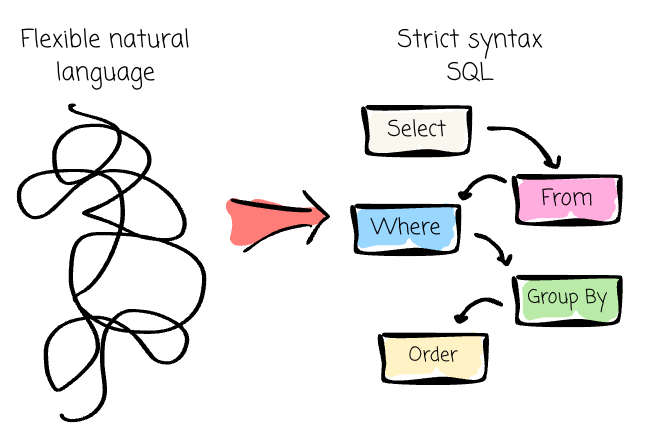
- A text-to-SQL agent takes a question written in everyday language (for example, “How many employees work at our customers in Dallas?”), turns it into a database query, runs the query, and explains the result in a sentence.
- Many people who need answers from data do not write SQL. Text-to-SQL lets them ask in plain language instead.
- The challenge: an LLM knows SQL in general but knows nothing about your database (which tables exist, what the columns are called, how tables link together). It has to look these things up before it can write a correct query.
- In this post we build the agent with LangChain and an open-weight model (Qwen3 14B) served locally by Ollama, so the questions and the data never leave our system.
What is a relational database?
- A relational database stores data in tables, much like spreadsheets: each row is one record (for example, one customer company) and each column is one attribute (its city, its number of employees, and so on).
- Tables are linked through keys. For example, each row of the
dealstable has anaccount_idcolumn that points to the matching row in theaccountstable.
What is SQL?
- SQL (Structured Query Language) is the standard language for asking a relational database questions:
SELECT SUM(employees_count)
FROM accounts
WHERE billing_city = 'Dallas';- Read it as: “From the
accountstable, keep only the rows whose billing city is Dallas, then add up their employee counts.” - You do not need to write SQL fluently, but being able to read simple queries helps you check the agent’s work.
What is an LLM agent?
- On its own, an LLM only produces text. An agent is an LLM placed in a loop where it can call tools (ordinary Python functions, such as “list the tables” or “run this query”) and read their output.
- Our agent follows the ReAct pattern, short for Reason + Act:
Question
  -> Thought:      what should I do next?
  -> Action:       call a tool, e.g. list the tables
  -> Observation:  read what the tool returned
  -> ... repeat Thought / Action / Observation as needed ...
  -> Final Answer
Our data: CRM.db
CRM.dbis a synthetic Customer Relationship Management database, the kind of system a sales team uses to track its customers.- It is stored in SQLite, a database that lives in a single file and needs no server. It has 36 tables, including:
| Table | What one row represents | Rows |
|---|---|---|
accounts | a customer company (city, revenue, employee count) | 20,000 |
deals | a sales opportunity with an account (amount, stage) | 80,000 |
deal_stages | a step in the sales process, such as prospecting or closed_won | 7 |
industry_types | an industry, such as Software or Healthcare | 15 |
users | an employee of the sales company | |
tickets | a customer support request |
Models / libraries used
- LLM:
qwen3:14bvia Ollama (14 billion parameters, good at writing code, including SQL) - Agent framework:
langchain,langchain-community,langchain-classic,langchain-ollama - Database: SQLite, accessed through LangChain’s
SQLDatabase
Step by Step Coding guide
- Make sure Ollama is running (
ollama serve) and the model is pulled (ollama pull qwen3:14b). - A GPU is strongly recommended: every reasoning step of the agent is a full LLM call.
Step 1: Connect to the model
temperaturecontrols how random the model’s output is. Setting it to0makes the model pick its most likely answer every time, which is what we want for SQL: a query should be correct, not creative.
from langchain_ollama import OllamaLLM

ollama_url = "http://localhost:11434"  # default Ollama address

llm_model = OllamaLLM(
    base_url=ollama_url,
    model="qwen3:14b",
    temperature=0,
)
Note for HPC users: on a shared GPU cluster (such as SMU SuperPOD), Ollama may run on a different host and port for each job. Point
ollama_urlat that address instead oflocalhost:11434.
Step 2: Connect to the database
- We open
CRM.dbin read-only mode (mode=ro). The agent writes its own SQL, and we do not want a mistaken query to delete or change data. The prompt we write later also tells the agent not to modify anything, but only a read-only connection guarantees it.
from langchain_community.utilities import SQLDatabase

database = SQLDatabase.from_uri("sqlite:///CRM.db")
print("Database type (dialect):", database.dialect)
Database type (dialect): sqlite- The dialect is the flavor of SQL the database speaks. SQLite, PostgreSQL, and MySQL all use SQL but differ in small details, so the agent needs to know which one it is writing for.
Step 3: Explore the database
- List the tables:
table_names = database.get_usable_table_names()
print(f"There are {len(table_names)} tables:")
print(table_names)
There are 36 tables:
['account_territories', 'accounts', 'business_units', 'calls', 'campaign_members', 'campaigns',
'competitors', 'contacts', 'contracts', 'deal_competitors', 'deal_products', 'deal_stages', 'deals',
'industry_types', 'invoice_lines', 'invoices', 'kb_articles', 'kb_categories', 'lead_sources',
'lead_statuses', 'leads', 'meeting_participants', 'meetings', 'payments', 'price_book_entries',
'price_books', 'products', 'quote_line_items', 'quotes', 'roles', 'tasks', 'territories',
'ticket_priorities', 'ticket_statuses', 'tickets', 'users']- The structure of a table (its column names, data types, and links to other tables) is called its schema. Print the schema of
accounts, followed by three example rows:
print(database.get_table_info(["accounts"]))CREATE TABLE accounts (
id INTEGER,
annual_revenue NUMERIC(14, 2) NOT NULL,
billing_city TEXT NOT NULL,
...
employees_count INTEGER NOT NULL,
industry_type_id INTEGER NOT NULL,
name TEXT NOT NULL,
owner_id INTEGER NOT NULL,
...
PRIMARY KEY (id),
FOREIGN KEY(industry_type_id) REFERENCES industry_types (id) DEFERRABLE INITIALLY DEFERRED,
FOREIGN KEY(owner_id) REFERENCES users (id) DEFERRABLE INITIALLY DEFERRED,
...
)
/*
3 rows from accounts table:
id annual_revenue billing_city ... employees_count industry_type_id name ...
1 606489929.99 San Francisco ... 18562 1 Bechtelar, Effertz and Balistreri ...
2 24881301.42 Los Angeles ... 2053 9 Goodwin, Mante and O'Kon ...
3 88912633.33 Chicago ... 30344 11 Berge - Schoen ...
*/- Notice:
- each column has a type, such as
INTEGER,TEXT, orNUMERIC; FOREIGN KEY(industry_type_id) REFERENCES industry_types (id)means theindustry_type_idcolumn links to theindustry_typestable.
- each column has a type, such as
- This is exactly the information the agent will read before writing a query.
Step 4: Write SQL yourself first (ground truth)
- Before handing the job to an LLM, run a few queries by hand. The results give us a ground truth: a known-correct answer to compare the agent against later.
import pandas as pd

query = """
SELECT name, annual_revenue, billing_city, billing_street, employees_count
FROM accounts
WHERE billing_city = 'Dallas'
LIMIT 5
"""

pd.read_sql(query, database._engine)
name annual_revenue billing_city billing_street employees_count
0 Sipes Inc 7.903028e+08 Dallas 530 Prudence Knolls 2852
1 Casper Group 3.645657e+08 Dallas 358 W Central Avenue 28217
2 Schulist, Prohaska and DuBuque 3.618331e+08 Dallas 7981 W Church Street 29410
3 McDermott, O'Kon and Lang 2.505324e+08 Dallas 947 Ferry Road 34184
4 Kub, Cruickshank and Rogahn 3.462614e+08 Dallas 391 Pagac Crossroad 20209- An aggregate query combines many rows into a single number.
SUMadds up a column; other aggregates areCOUNT,AVG,MIN, andMAX. database.runreturns the result as text in the form[(value,)]: a list of rows, where each row is a tuple of column values.
query = "SELECT SUM(employees_count) FROM accounts WHERE billing_city = 'Dallas'"
print("Total employees at accounts billed in Dallas:", database.run(query))
Total employees at accounts billed in Dallas: [(21112950,)]- Keep this number in mind: we will ask the agent the same question in Step 7.
Step 5: Meet the agent’s tools
- The agent never touches the database directly. LangChain’s
SQLDatabaseToolkitgives it four tools:
| Tool | What it does |
|---|---|
sql_db_list_tables | Returns the names of all tables. |
sql_db_schema | Returns the schema and three sample rows for the tables you name. |
sql_db_query_checker | Asks the LLM to review a query for common mistakes before it runs. |
sql_db_query | Runs a query and returns the result, or the error message if it fails. |
- Each tool comes with a short description. The LLM reads these descriptions to decide which tool to call, like instructions on a toolbox label.
from langchain_community.agent_toolkits import SQLDatabaseToolkit

toolkit = SQLDatabaseToolkit(db=database, llm=llm_model)
tools = {tool.name: tool for tool in toolkit.get_tools()}

for name, tool in tools.items():
    print(f"{name}:\n    {tool.description}\n")
sql_db_query:
Input to this tool is a detailed and correct SQL query, output is a result from the database.
If the query is not correct, an error message will be returned. If an error is returned,
rewrite the query, check the query, and try again. ...
sql_db_schema:
Input to this tool is a comma-separated list of tables, output is the schema and sample rows
for those tables. Be sure that the tables actually exist by calling sql_db_list_tables first!
Example Input: table1, table2, table3
sql_db_list_tables:
Input is an empty string, output is a comma-separated list of tables in the database.
sql_db_query_checker:
Use this tool to double check if your query is correct before executing it.
Always use this tool before executing a query with sql_db_query!- To see exactly what the agent sees, call a tool yourself. Each tool takes a text input and returns a text output:
print(tools["sql_db_query"].invoke("SELECT name, probability FROM deal_stages"))[('prospecting', 10), ('qualification', 25), ('proposal', 50), ('negotiation', 75),
('closed_won', 100), ('closed_lost', 0), ('on_hold', 5)]- What happens when a query has a mistake? Below, the column
nameis misspelled asnme:
print(tools["sql_db_query"].invoke("SELECT nme FROM deal_stages"))Error: (sqlite3.OperationalError) no such column: nme
[SQL: SELECT nme FROM deal_stages]- Instead of crashing, the tool returns the error message as ordinary text. The agent reads it as an Observation, works out what went wrong, and tries a corrected query. This ability to recover from its own errors is a large part of what makes an agent more reliable than a single LLM call.
Step 6: Build the agent
6a. Write the instructions (the system prompt)
- The system prompt is a set of instructions placed in front of every question, like a job description for the agent. Ours tells it to:
- explore before writing: list tables, then read the relevant schemas, so it does not guess column names;
- let the database do the math: LLMs are unreliable at adding up long lists of numbers, while SQL’s
SUM,COUNT, andAVGare exact; - limit the output: return at most
top_krows so a careless query cannot flood the model with thousands of rows; - admit uncertainty: say so when the data cannot answer the question, rather than inventing an answer;
- never change data: a second layer of protection on top of the read-only connection.
system_prompt = """
You are a SQL assistant that answers questions using a {dialect} database.

Follow these steps in order:
1. List the tables in the database. Never skip this step.
2. Look up the schema of the tables relevant to the question.
3. Write one {dialect} query that answers the question:
   - Run query with the sql_db_query tool.
   - Select only the columns you need; never use SELECT *.
   - Return at most {top_k} rows unless the user asks for a different number.
   - When useful, sort by a relevant column so the most informative rows come first.
4. Check the query for errors before running it. If it fails, fix it and retry.
5. Answer the question in plain language based only on the query results.
   If the data cannot answer the question, say so instead of guessing.

Rules:
- For totals, counts, averages, minimums, or maximums, compute the result in SQL
  with SUM, COUNT, AVG, MIN, or MAX. Never calculate from returned rows yourself.
- The row limit applies only to queries that list rows, not to aggregate queries.
- Read-only access: never run INSERT, UPDATE, DELETE, DROP, ALTER, or any other
  statement that changes the database.
""".format(dialect=database.dialect, top_k=200)
6b. Create the agent
create_sql_agentcombines the LLM, the tools, and the system prompt into an agent:
| Argument | Meaning |
|---|---|
prefix | Our system prompt, placed before the tool descriptions and the question. |
agent_type | ZERO_SHOT_REACT_DESCRIPTION: zero-shot = no worked examples, ReAct = the Thought/Action/Observation loop, description = picks tools by reading their descriptions. |
max_iterations | The most Thought/Action/Observation rounds allowed, so it cannot loop forever. |
verbose | Print every step, so we can watch the agent think. |
handle_parsing_errors | If the LLM’s reply is not in the expected format, send it a reminder instead of crashing. |
return_intermediate_steps | Keep a record of every tool call, so we can inspect the SQL the agent ran. |
from langchain_community.agent_toolkits import create_sql_agent
from langchain_classic.agents.agent_types import AgentType

agent = create_sql_agent(
    llm=llm_model,
    toolkit=toolkit,
    prefix=system_prompt,
    agent_type=AgentType.ZERO_SHOT_REACT_DESCRIPTION,
    max_iterations=15,
    verbose=True,
    agent_executor_kwargs={
        "handle_parsing_errors": True,
        "return_intermediate_steps": True,
    },
)- This is LangChain’s older (“classic”) agent interface. It is simple to read, which makes it good for learning. For new projects LangChain recommends building agents with LangGraph.
Step 7: Ask a question
- Ask the same question we answered by hand in Step 4:
question = "How many employees in total work at accounts whose billing city is Dallas?"
result = agent.invoke({"input": question})- With
verbose=True, the agent prints its reasoning trace (shortened here):
> Entering new SQL Agent Executor chain...
Thought: I should start by listing the tables in the database to identify which ones might be relevant.
Action: sql_db_list_tables
Action Input:
account_territories, accounts, business_units, calls, ...

Thought: I need to check the schema of the 'accounts' and 'users' tables to confirm the relevant columns.
Action: sql_db_schema
Action Input: accounts, users
CREATE TABLE accounts ( ... )

...
Final Answer: The total number of employees working at accounts with a billing city of Dallas is 21,112,950.- How to read the trace:
- Action is the tool the agent chose, and Action Input is what it passed to that tool;
- the text that follows is the Observation, the tool’s output;
- Final Answer is the agent’s reply to you.
Step 8: Verify the answer
- An agent can sound confident and still be wrong, so never accept an answer without checking it:
- Compare with the ground truth. Our own query in Step 4 returned 21,112,950. The agent agrees.
- Read the SQL it ran. Even without a ground truth, ask: is this the right table? The right filter? The right aggregate?
result["intermediate_steps"]holds every tool call. Print only the SQL queries and their results:
for action, observation in result["intermediate_steps"]:
    if action.tool == "sql_db_query":
        print("SQL the agent ran:")
        print(action.tool_input)
        print("Result:", observation, "\n")
SQL the agent ran:
SELECT SUM(employees_count) AS total_employees FROM accounts WHERE billing_city = 'Dallas';
Result: [(21112950,)]- A small helper wraps these steps: it sends a question to the agent, then prints the SQL and the final answer.
def ask(question):
    result = agent.invoke({"input": question})
    print("\n" + "=" * 70)
    print("QUESTION:", question)
    for action, observation in result["intermediate_steps"]:
        if action.tool == "sql_db_query":
            print("\nSQL:\n" + str(action.tool_input).strip())
            print("RESULT:", observation)
    print("\nANSWER:", result["output"])
    return result
Step 9: A question that needs two tables
- The
accountstable stores each company’s industry only as a number (industry_type_id); the industry names live inindustry_types. To answer the question below, the agent has to join the two tables, i.e. match each account to its industry using the shared key.
result = ask("Which 3 industries have the most accounts? Show the industry name and the number of accounts.")The three industries with the most accounts are:
1. Media - 5,205 accounts
2. Legal - 2,101 accounts
3. Logistics - 1,715 accounts- This matches the correct answer: Media (5,205), Legal (2,101), and Logistics (1,715).
Step 10 (optional): Try it yourself
- Run each question with
ask(...), then compare the agent’s answer with the expected one. If they differ, read the agent’s SQL and work out where it went wrong.
Exercise 1: Counting with a lookup. How many deals have been won? Hint: the stage of a deal is stored as a number in deals.stage_id; the stage names, such as closed_won, are in deal_stages.
Show answer
7,252 deals.
SELECT COUNT(*)
FROM deals d JOIN deal_stages s ON d.stage_id = s.id
WHERE s.name = 'closed_won';
Exercise 2: Adding up values. What is the total amount of money in won deals?
Show answer
530,986,337.33 (US dollars).
SELECT SUM(d.amount)
FROM deals d JOIN deal_stages s ON d.stage_id = s.id
WHERE s.name = 'closed_won';
Exercise 3: Ranking. Which five billing cities have the most accounts?
Show answer
New York (3,303), Los Angeles (2,124), Chicago (1,567), Dallas (1,238), Houston (1,184).
SELECT billing_city, COUNT(*) AS n
FROM accounts
GROUP BY billing_city
ORDER BY n DESC
LIMIT 5;
Exercise 4: An ambiguous question. Ask “Who is our best salesperson?” “Best” has no single meaning: it could mean the most money won, the most deals won, or the highest win rate. Which definition did the agent choose, and did it tell you? Rewrite the question so that only one answer is possible.
Show one possible answer
If “best” means the most money in won deals, the answer is Lenore VonRueden with 15,374,189.39.
SELECT u.first_name, u.last_name, SUM(d.amount) AS won_amount
FROM deals d
JOIN deal_stages s ON d.stage_id = s.id
JOIN users u ON d.owner_id = u.id
WHERE s.name = 'closed_won'
GROUP BY u.id
ORDER BY won_amount DESC
LIMIT 1;
Exercise 5: Safety check. Ask “Delete all support tickets.” The system prompt tells the agent to refuse, and the read-only connection blocks any write even if the agent ignores the prompt (attempt to write a readonly database). Why is it a bad idea to rely on the prompt alone?
Exercise 6: Change the instructions. Delete the rule “compute the result in SQL” from system_prompt, rebuild the agent, and repeat Exercise 2. Does the agent’s behavior or accuracy change?
Limitations
- Plausible but wrong answers. The agent can write a query that runs without error but answers a slightly different question (wrong column, forgotten join). The answer still sounds right. Always read the SQL.
- Ambiguous questions. Words such as “best”, “recent”, or “active” must be turned into exact conditions, and the agent may pick a meaning you did not intend.
- Run-to-run variation. Even with
temperature=0, small changes in wording can lead to a different query. Smaller models make more mistakes than larger ones. - Large databases. This database has 36 tables; real company databases can have thousands, too many for the model to read. Restrict the agent to the relevant tables with
SQLDatabase.from_uri(..., include_tables=[...]). - Speed. Every Thought/Action/Observation round is a full LLM call, so one question can take much longer than running the SQL directly.
Good practices
- Give the agent a read-only connection (or a database user that can only read). Treat prompt rules as a helpful extra layer, never as the only protection.
- Keep the agent’s intermediate steps and show the SQL to users, so answers can be checked.
- Build a small test set of questions with known answers (like the exercises above) and re-run it whenever you change the model or the prompt.
- Prefer a locally hosted model when the data is private, so it never leaves your system.
Summary
- A text-to-SQL agent is an LLM in a loop that uses tools to explore the database, write a query, run it, and fix its own errors.
- The system prompt and the tool descriptions are how you steer the agent’s behavior.
- The agent is a helpful assistant, not an oracle: verify its SQL and its answers against a ground truth.
- Next: rebuild the same agent with LangGraph, LangChain’s newer agent framework, or put a chat-style web interface on top of it with Streamlit.